The week the boring model won: notes from two RTX 3090s
I put Z.ai's GLM 4.7 against a boring dense model on two RTX 3090s. The winner kept switching, and the line it switches on is about 64K tokens.

Hey, welcome back. A little while ago I told you, without much tact, that running two LLMs on a mini PC is a waste of time. Consider this the other half of that story, the part where I stop complaining about the small box and put the same models onto real cards. It is a field report rather than a tutorial, because I spent a week with a stopwatch and a pair of graphics cards and came away with an answer that surprised me, and I think it will save some of you a bad purchase or a wasted afternoon.
Here is the setup in one breath. There is a model everyone is excited about, GLM 4.7 from Z.ai, a mixture-of-experts design that is supposed to be both clever and light. I wanted to know something narrower than “is it good,” because good is cheap to say. I wanted to know whether it deserves to live on hardware I pay the electricity bill for, measured against a plain, unfashionable model that already does its job without any drama. So I put both of them on two RTX 3090s and just watched the numbers.
The cast
Two RTX 3090s, twenty-four gigabytes each, wired into a normal desktop with no exotic interconnect between them. That last detail matters more than it sounds, because the two cards only talk to each other at about 1.4 gigabytes a second, which is slow, and slowness between cards has a way of quietly rewriting your conclusions. In the fast lane, GLM 4.7. In the slow-and-steady lane, an ordinary dense model of the same size that I already trust. Both ran under the same tooling so neither got a handicap.
The jump off the mini PC
Before the head to head, one picture to justify the whole exercise.
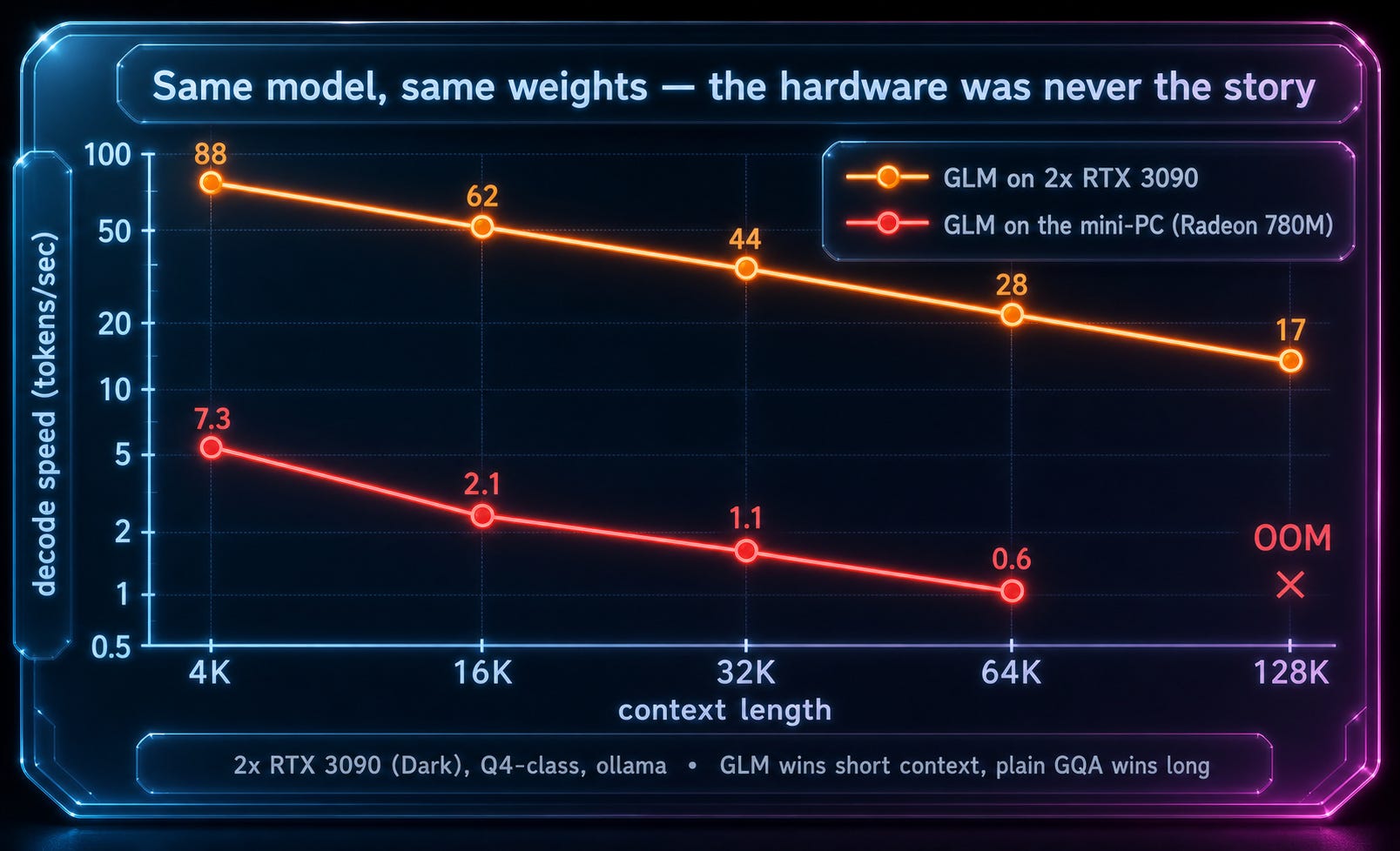
Same model, same weights, two very different machines. On the mini PC it managed a crawl and gave up entirely at long context, while on the 3090s it runs many times faster and keeps going where the little box could not even load the prompt. If you want the receipts, every number here, the exact ollama and vLLM configs, and the scripts to reproduce all of it live in the benchmark writeup I put up, raw CSVs and all.
Speed, and the moment it flips
I started with the number everyone asks about, raw generation speed, across growing context.
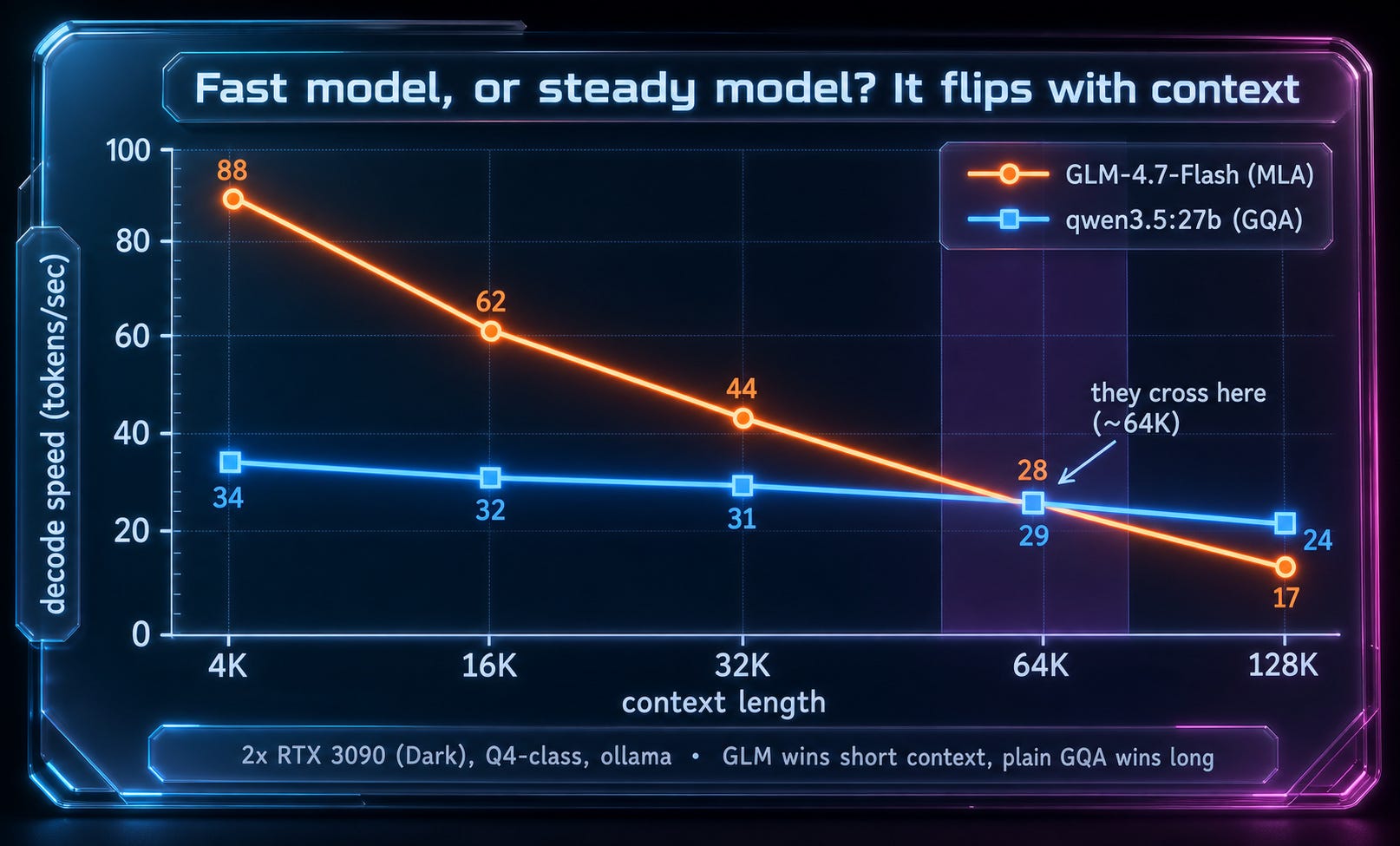
At small context GLM 4.7 was a rocket, close to ninety tokens a second, comfortably more than double its rival. Then it started leaking speed as the prompt grew, and it never stopped leaking, sliding down through the sixties and forties and into the teens by the deep end. The dense model, meanwhile, just plodded along at the same pace no matter what I fed it. The two lines met somewhere near sixty-four thousand tokens, and after that the unfashionable model was simply the faster one. That single crossing point turned out to be the whole story, and I did not expect the boring horse to win any leg of the race.
Memory tells the opposite story
Here is where the clever design stops looking like a loser. The same trick that makes GLM slow at the deep end also keeps its memory footprint small, so it packs more context onto one card before it has to spill over to the second.
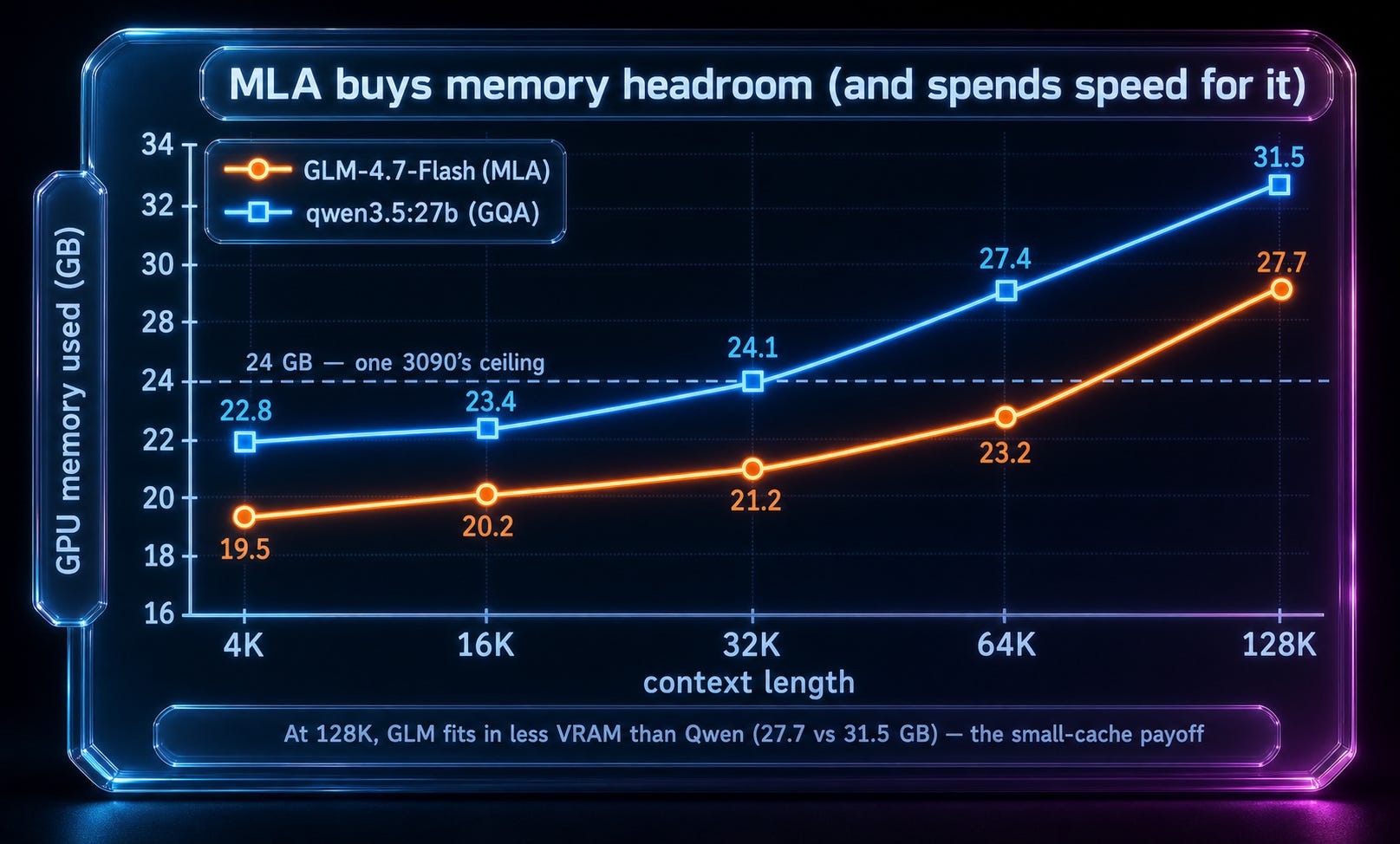
So you get a genuine fork in the road. If your problem is speed, the plain model wins the long game. If your problem is fitting an enormous prompt onto a single 24 GB card, GLM wins, and it is not close. The catch is that these are the same model, so you are really choosing which constraint you would rather feel. It trades speed for memory, plainly and consistently, and no amount of wishing makes that trade disappear.
Two cards, and why more can be less
The part that genuinely surprised me was trying to use both cards at once.
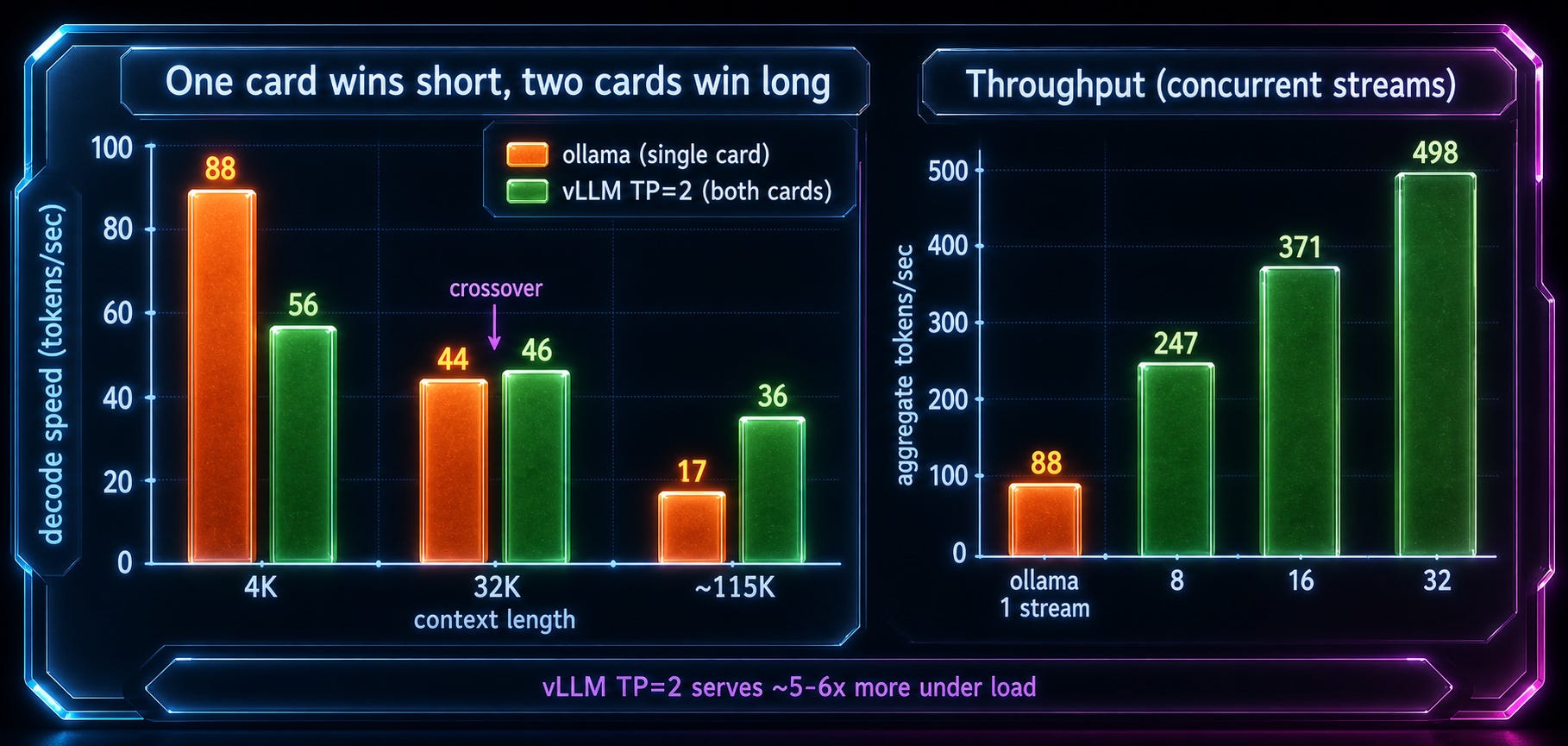
For one conversation at short context, a single card beat the pair, because splitting the model across both made every token pay a toll over that slow 1.4 gigabyte link, and at short prompts the toll cost more than the help. Only when the context grew long did two cards pull ahead, and when I stopped chatting and started serving many requests at once, the pair pulled far ahead, several times the throughput of one. So even the question “should I use all my hardware” answered itself with a shrug and a “depends what you are doing.”
The verdict, which is boring on purpose
Short interactive work, one person at a keyboard: run GLM 4.7 on a single card, it is quicker and it feels great. Long single-user context: run the dull dense model, still on one card. Serving a crowd: split GLM across both cards and take the throughput. There is no trophy winner here, only the right tool for the exact shape of the job, and the real skill is being honest with yourself about which job you actually have.
That honesty is the reason I run this hardware in the first place. The tools I build on ModelDirectory live on these same cards, and the heavy ones are exactly the short bursts where a fast model shines, like the STL upscaler that adds detail to a printable model and the texture generator that paints one from a prompt. The light ones barely wake the GPU, like the print orientation checker and the print cost calculator. Being able to run all of them on cards I already own, and choosing the right model per task instead of paying rent on someone else’s, is the whole game when you measure it honestly.
Next week I want to push the same question onto real long workloads instead of tidy synthetic ones, and see if that sixty-four thousand crossover holds when the tokens are doing actual work. If you want that follow-up in your inbox, you know where the button is. Talk soon.